Charlie Script: An Effortlessly Elegant Handwritten Typeface
There’s something undeniably captivating about a font that feels both personal and polished. Charlie Script delivers exactly that—a smooth, natural handwritten signature style that brings warmth and authenticity to any design. Whether you’re working on a brand identity, wedding stationery, or social media graphics, this typeface adds a touch of effortless sophistication without sacrificing readability.
What Makes Charlie Script Stand Out?
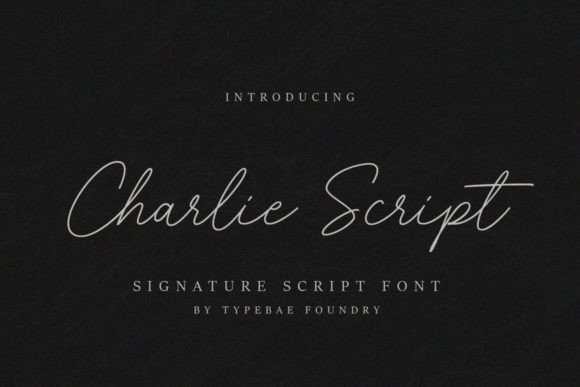
Charlie Script is more than just another script font. Its flowing letterforms mimic the natural rhythm of a handwritten signature, creating a sense of intimacy and elegance. The font includes a full set of glyphs and ligatures, all easily accessible thanks to PUA encoding. This means you can explore swashes, alternate characters, and stylistic variations to customize your text precisely.
As a premium display font, it’s designed to shine in projects where personality and clarity matter. Unlike some overly ornate script fonts, Charlie Script maintains excellent legibility even at smaller sizes, making it versatile for both digital and print applications.
Creative Use Cases for Charlie Script
This handwritten font excels in scenarios where you want to convey warmth, creativity, or a handcrafted feel. Here are some practical ways designers are using it:
- Logo and Brand Identity: Perfect for boutique brands, lifestyle blogs, or artisan products that want a personal touch.
- Editorial and Packaging Design: Ideal for book covers, magazine headlines, product labels, and cosmetic packaging.
- Social Media and Web Design: Great for Instagram quotes, Pinterest graphics, website banners, and call-to-action buttons.
- Event Stationery: Enhances invitations, thank-you cards, menus, and event signage with a refined, hand-lettered look.
- Merchandise and Digital Products: Works beautifully on mugs, tote bags, planners, and digital downloads.
Tips for Using Charlie Script Effectively
To get the most out of this typeface, consider a few best practices. First, always test how it pairs with other fonts. A clean sans serif or a simple serif font can balance its decorative nature, creating a harmonious layout. For example, use Charlie Script for headlines and pair it with a neutral body font for paragraphs.
Next, pay attention to spacing and size. While the font is legible, adjusting letter-spacing slightly can improve readability in longer text blocks. Also, take advantage of the included alternates and ligatures to add variety and avoid repetition in your designs.
Finally, ensure the font’s license aligns with your project. Charlie Script is a commercial font, so review its terms for use in client work, merchandise, or digital products. This helps you maintain professional standards and avoid licensing issues down the road.
Enhancing Your Design Toolkit
Choosing the right typeface is a subtle yet powerful way to elevate your work. A well-designed script font like Charlie Script doesn’t just decorate—it communicates tone, builds brand recognition, and adds a layer of polish that generic fonts often lack. It’s a creative asset that can transform ordinary layouts into memorable visual experiences.
Whether you’re a seasoned designer or just starting out, incorporating a versatile, high-quality font into your toolkit can streamline your workflow and inspire new ideas. With its timeless appeal and practical flexibility, Charlie Script is worth considering for anyone looking to add a personal, professional flair to their next project.